
Check Out Our All "Comment Tutorials" Related Posts
▪ How To Add Number In Comments At Blogger Blog?
▪ How To Add Reply Option To Blogger Comments?
▪ How To Change "Post a Comment" Text In Blogger Blog?
▪ How To Customize Blogger's Comment Box?
▪ Unlimited Backgrounds, Themes and Patterns For Comment Box
▪ How To Highlight Author Comments In Blogger?
Now you can decorate your blogger blog comment form more unique and creatively with lots of background patterns. In any occasion such as EID day, Christmas, Valentines day etc. you can show your creativity by changing the comment form background. Remember, an attracting comment form hold visitors to leave their comments. Here I am giving some background patterns for example. I described in my previous post how you can change blogger comment form theme. If you do not read yet, I recommended you to read it first.
ALSO READ: Add Sliding Social Share Buttons With Counters
Demos:

▼
https://blogger.googleusercontent.com/img/b/R29vZ2xl/AVvXsEhGMUkYHSweS7xsYUApf6sz4LzHYvXuR2VQP2OwEZno0bKGZP2E75BHSCS5i6gylPe_f2n3VX2RhZYQDoKM3NxFeIO9mIY3B-oarazxUpDMSlJ3nN03t4REwZP8HwP_xmLICN3i-oofbYQ/s1600/11.jpg

▼
https://blogger.googleusercontent.com/img/b/R29vZ2xl/AVvXsEiBacF1lkxBg9DQ21Jg0ELKDd33nqGuEFCxn9S2AyLPcQuawb49ovwmv-6HyveDJC2-7rvHxnEF_1QBiQyoPEtyNXVWRpfxJ1SRax71ZFs5l-CkJAIU1cZJkFCgdygr1TvxPafsEc-RHYM/s1600/22.jpg
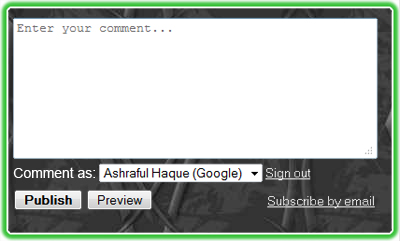
▼
https://blogger.googleusercontent.com/img/b/R29vZ2xl/AVvXsEhM5vHDdY8lmPHA-SozdZIDyPavGtTAp1UJd165Qz7z67qQIBshLHDEEsV3KNiFSVKSV9RYxn-Y6P2kepGM9eck4Kj4udwFa8dqfeLaeE0xujqLiSSiNfFR5VLB0YtSoVav4VxRaJ8YOCo/s1600/33.jpg

▼
https://blogger.googleusercontent.com/img/b/R29vZ2xl/AVvXsEhxbWX-28fe6yEiiTd2ckDJEVZ1ywZJ42B0xohjalwzzFPT2nmEH2GKiTVmddDb3e-ZUsob8NLKySDiCN7_ySUarikHZO73we6wf-rrPCWRR7XqoSId-iXLsgIRrK1MsHQkJdIGUzFLChk/s1600/44.jpg

▼
https://blogger.googleusercontent.com/img/b/R29vZ2xl/AVvXsEimya6kOwpEUBgntXVIluX3YRT2Z8zGbAHymRdFLdIRPSFMzRwDRlj2Q4b9ZUncxIt2OHqehHJSmFXuSm94rrmItD_O9_Q-R7DCC-wc9tmz2UKWQjQuUNnNVEhMnsZlGv5uwDDMMTrKedk/s1600/55.jpg

▼
https://blogger.googleusercontent.com/img/b/R29vZ2xl/AVvXsEij7J4NmrzDKmvZfQLOyHXNGgPe9SAYSc5isPuDTTX8nn3w4n5xiYViQMGPZasjOR5RhqoMehqPvKti7sdtkMK_-zBwynXMJ0ZSL9B0oqbPUUkE7CQDHsUNP6VNNqpYUDuGo_YUOGy3ZFo/s1600/66.jpg
Here are some sites from where you can collect free eye catching background patterns. These sites has different categories of backgrounds. These are as follows:
1. http://subtlepatterns.com/
2. http://www.patterncooler.com/
3. http://bestdesignoptions.com/
4. http://www.backgroundlabs.com/
5. http://www.dinpattern.com/
You can get more uncountable background patterns from other sources. Just make a search on Google.
SEE ALSO: How To Add Custom Favicon To Blogger To Be Unique
How to add background theme to comment box
1. First read this tutorial.
2. After reading and applying it on your blog, you just need to replace IMAGE LINK GOES HERE with your selected background pattern image link. Keep in mind, background patterns should not be a big image.
3. Other changes depend on your wish.
I hope all is clear as mirror. If anything is unclear and need help to setup, please don’t late to ask me.
Be happy and Be good friends.
Post a Comment
Please DON'T spam here. Spam comments will be deleted just after our review.