
Check Out Our All "Comment Tutorials" Related Posts
▪ How To Add Number In Comments At Blogger Blog?
▪ How To Add Reply Option To Blogger Comments?
▪ How To Change "Post a Comment" Text In Blogger Blog?
▪ How To Customize Blogger's Comment Box?
▪ Unlimited Backgrounds, Themes and Patterns For Comment Box
▪ How To Highlight Author Comments In Blogger?
Today we will show you how to number to each comment. This system helps you when you are replying to a specific comment. In our previous tutorial we wrote about How To Add Reply Option To Blogger Comments. If you allow comments from anonymous visitors this tutorial will helps you so much when you reply anonymous comments. For example: If you have 3 anonymous comments and need to reply them you can simply pinpoint your reply answer by saying comment #12 or comment @13 etc.
This comment numbering system also gives you a unique comment permalink for each comment. It means you will get a unique link for each comment. So, you or your visitors can use this comment permalink to go straight to the wanted comment.
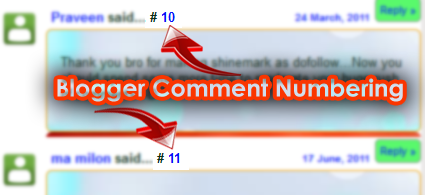
How To Add Number To Each Comment In Blogger Blog?
1. Log in to Blogger Blog
2. Click your blog title.
3. Click Theme from left side menu.
4. Backup your template before editing.
5. Click Edit HTML, from the drop down menu under CUSTOMIZE option
6. Click in the code box and press CTRL+F
7. Now find the below code.
<b:loop values='data:post.comments' var='comment'>
8. Add the below code just before/ above it
<!--comment-number-start--><script type='text/javascript'>var CommentsCounter=0;</script> <!--comment-number-end-->
9. Now find this code...
<data:commentPostedByMsg/>
10. Now paste the below code just after/ below it
<!--comment-number-start-shinemat.com-->
<span class='comm-num'>
#<a expr:href='data:comment.url' title='Comment Link'>
<script type='text/javascript'>
CommentsCounter=CommentsCounter+1;
document.write(CommentsCounter)
</script>
</a>
</span>
<!--comment-number-end-shinemat.com-->
11. Finally click Save Template and you are done. Refresh your blog, you will see numbers in every comment.
Have a nice day.
This article is great!! You really helped me with the process! Thank you very much
ReplyDeleteHi... just tried it and it didn't work for me :(
ReplyDelete@Jenny from My Handmade Home What's the problem brother?
ReplyDeleteAll my comments say #1
ReplyDeleteThis article is great!! You really helped with the process! Thank you very much
ReplyDeletePost a Comment
Please DON'T spam here. Spam comments will be deleted just after our review.